
What leaves
Followed shows as rss outlines: title and xmlUrl. Optional description, image, author when present.
The Podcast App writes a standard OPML 2.0 file of the shows you follow and their RSS feed URLs. Settings → Manage Subscriptions → Export Subscriptions. iOS and Android open the system share sheet. Desktop saves a file. Import uses the same sheet. Unlimited offline downloads are free. Premium is Podcast Brain — it does not gate export or offline. No app-inserted ads; host-read mid-rolls may still play.
Last updated: September 12, 2026
| Job | Locked-in app | The Podcast App |
|---|---|---|
| Export subscriptions | Often hard or missing | OPML export on free |
| Import elsewhere | Depends | Standard OPML |
| Offline after switch | Re-download | Unlimited offline free here |


Followed shows as rss outlines: title and xmlUrl. Optional description, image, author when present.
Progress, queue, downloads, history, playlists, Brain data, settings. Re-download on Wi-Fi after a move.
Podcast Brain — optional AI. It does not unlock export, import, or unlimited offline.
Searchers asking for a podcast app with OPML export want a portable follow list, not a full-library backup. The Podcast App exports OPML 2.0. Generator in the head is The Podcast App plus the app version. Each show is an outline with type="rss", text/title, and xmlUrl set to the feed URL from your library.
Public RSS follows. Optional description, imageUrl, and author when those fields exist on the podcast. If shows have more than one category, outlines group under the first category. Empty libraries still produce valid OPML 2.0 with an empty body.
Not playback position. Not the queue. Not downloads. Not history, favorites, playlists, Brain memory, settings, or account credentials. Those live in the app. OPML is the portability layer for followed shows — the same limit as other RSS clients.
You can leave without rebuilding every follow by hand. You can keep a dated copy before you try another player. You can import the same list back. The inbound path is the switch guide.
The control is labeled Export Subscriptions. Subtitle: Save your subscriptions to a file. It sits next to Import Subscriptions on the same Manage Subscriptions sheet. Premium is not in that path.
Settings → Manage Subscriptions (Import/Export) → Export Subscriptions. That is the only export entry this page claims.
iOS and Android write a timestamped .opml into temp storage and open the system share sheet. Desktop has no share sheet that accepts a file — it asks where to save instead. Canceling the dialog is not a failure.
Save the file to Files, Drive, or Mail before you delete the app. Export first. Uninstall second. The screenshot below is that share sheet, not a mock.
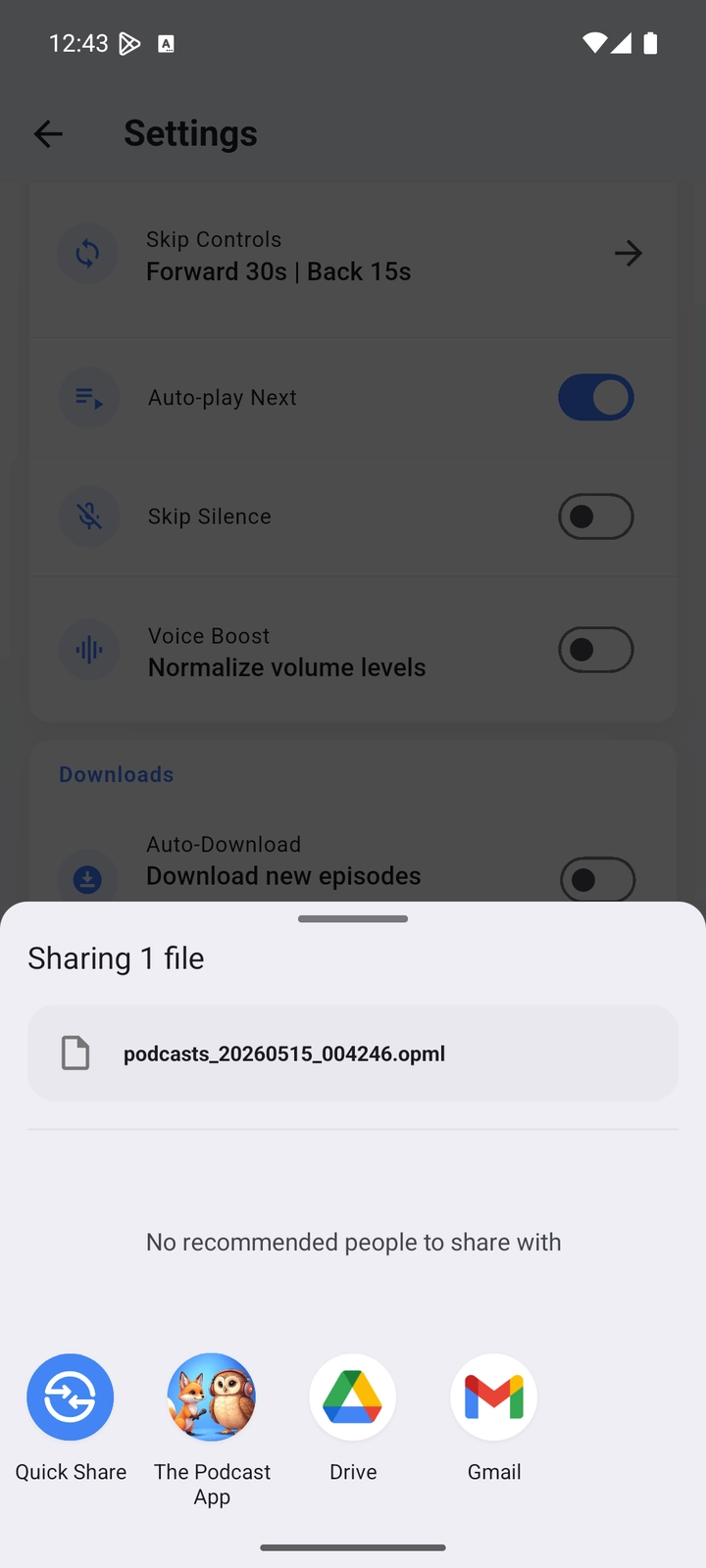
Coming in: Settings → Manage Subscriptions → Import Subscriptions. Pick a file. An empty Home Import CTA opens the same sheet. Files over 10MB are rejected. The picker accepts any type because many OPML files have no recognized extension; the app then checks that the content looks like OPML.
Need a file before you have the app? Use the site OPML generator. Full inbound steps: Switch.
Subscribe, queue, stream, unlimited offline downloads, OPML export again. No app-inserted ads. Premium does not unlock that list.
The free podcast app is the listening product. OPML import and export are core player features. Unlimited offline downloads are free — Premium does not expand offline. See listen without Wi-Fi.
Podcast Brain is optional transcript-backed AI. It is not how we unlock a portable library. The library is already portable. Compare tradeoffs on Compare and the 2026 rubric on best podcast app 2026.
This page does not invent competitor menus. Use each app’s current export docs. Soft notes only.
Those clients document OPML import and, in current support docs, export of subscriptions. Export there, then Import Subscriptions here — or export here and import there. Alternatives: Pocket Casts, Overcast.
On Mac, File → Library → Export Playlist / OPML (wording varies by macOS). iOS does not always expose a one-tap OPML export — use a Mac pass-through or another exporter, then move the file to the phone. Apple Podcasts alternative.
Spotify has no first-party OPML export of shows. That is a Spotify limit. Workarounds only: a text list or screenshots of follows, then search those titles after you import everything else. Do not expect this app to pull a Spotify library via OPML.
A successful import is a follow list, not a cloned offline library. Dead feeds and redirects show up as failed or duplicate rows. Unsubscribe extras. Re-download the episodes you actually commute with. The player has no app-inserted ads; creator mid-rolls in the episode file can still play. Details: no app-inserted ads.
An OPML 2.0 file of the shows you follow. Each outline is type rss with title and xmlUrl (the feed URL). Optional description, imageUrl, and author are included when the library has them. Categories group outlines when more than one category exists. Export does not include playback progress, queue, history, favorites, downloads, settings, playlists, or account data.
Open Settings → Manage Subscriptions (Import/Export) → Export Subscriptions. On iOS and Android the app writes a .opml file and opens the system share sheet so you can save or send it. On desktop it asks where to save the file. Export is a free core feature. Premium is Podcast Brain — it does not gate export.
Open Settings → Manage Subscriptions → Import Subscriptions and pick the .opml file. An empty Home Import CTA opens the same sheet. The app accepts files up to 10MB, checks that the file looks like OPML, then subscribes to public RSS feeds. Invalid and private-network URLs are rejected. Auto-download starts off. No account is required to import on one device. The switch guide has the inbound path.
No. OPML carries public RSS subscriptions — title plus xmlUrl. Playback progress, queue state, listening history, favorites, downloaded files, playlists, Brain data, settings, and credentials stay in each app. After import, verify niche feeds, then re-download commute episodes on Wi-Fi. Unlimited offline downloads are free.
Yes, OPML export and import are free. Unlimited offline downloads are also free. Premium is optional Podcast Brain (transcript-backed AI). It does not unlock the player, export, import, or offline. You can use the player without Premium.
Yes. Export before you uninstall. The file is standard OPML 2.0 with rss outlines. Pocket Casts, Overcast, AntennaPod, and other OPML importers can typically read title + xmlUrl. Spotify has no first-party OPML export of shows — that is a Spotify limit, not an export bug here. Host-read mid-rolls in episode files may still play; The Podcast App does not insert its own ads.
No app-inserted ads. Host mid-rolls may still play. Premium does not unlock the player, export, or downloads.